本文以 Android 工程为例讲述 Gradle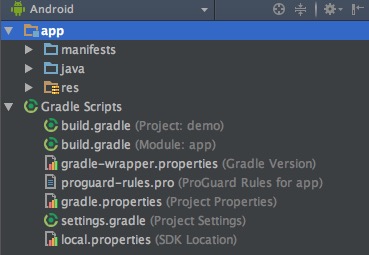
一、以 Android 工程为例
1. gradle-wrapper.properties of project
$rootProject.projectDir/gradle-wrapper.properties
上文提过,此文件用于配置构建该 project 的 Gradle 版本等1
2
3
4
5distributionBase=GRADLE_USER_HOME
distributionPath=wrapper/dists
zipStoreBase=GRADLE_USER_HOME
zipStorePath=wrapper/dists
distributionUrl=https\://services.gradle.org/distributions/gradle-2.14.1-all.zip
2. gradle.properties of project
$rootProject.projectDir/gradle.properties
此文件用于配置全局构建环境等1
2
3
4
5
6
7
8
9
10
11
12
13
14
15
16
17# Project-wide Gradle settings.
# IDE (e.g. Android Studio) users:
# Gradle settings configured through the IDE *will override*
# any settings specified in this file.
# For more details on how to configure your build environment visit
# http://www.gradle.org/docs/current/userguide/build_environment.html
# Specifies the JVM arguments used for the daemon process.
# The setting is particularly useful for tweaking memory settings.
org.gradle.jvmargs=-Xmx1536m
# When configured, Gradle will run in incubating parallel mode.
# This option should only be used with decoupled projects. More details, visit
# http://www.gradle.org/docs/current/userguide/multi_project_builds.html#sec:decoupled_projects
# org.gradle.parallel=true
以下设置条件允许可提高构建速度
(1) org.gradle.jvmargs=-Xmx1536m
JVM 最大允许分配的堆内存,条件允许的话,值越大,构建速度越快
(2) org.gradle.parallel=true
并行构建,条件允许可提高构建速度
(3) org.gradle.daemon=true
使用守护进程,条件允许可提高构建速度
Gradle 守护进程是一个后台进程, 运行着繁重的构建, 并在等待下一次构建的时保持自身存在,准备好下一次构建的数据和代码,存入内存中,提高后续构建的性能
注:开发机器上建议开启 Gradle 守护进程,但在持续继承环境下不推荐,参考 When should I not use the Gradle Daemon?)
3. local.properties of project
$rootProject.projectDir/local.properties
配置 Android SDK、NDK 路径1
sdk.dir=/Users/yutinglin/Documents/sdk/android
4. settings.gradle of project
$rootProject.projectDir/settings.gradle
对应一个 Settings 对象,包括 void include(String[] projectPaths)) 方法
用于指定哪些 module 参与构建1
include ':app'
5. build.gradle of project
$rootProject.projectDir/build.gradle
对应一个Project对象
5.1 Project 具备 buildscript 属性
包括自身及 subprojects1
2
3
4
5
6
7
8
9
10
11
12
13# 配置 Android Gradle Plugin
buildscript {
repositories {
jcenter()
}
dependencies {
# 指定 Android Gradle Plugin 版本号
classpath 'com.android.tools.build:gradle:2.2.2'
// NOTE: Do not place your application config here; they belong
// in the individual module build.gradle files
}
}
5.2 Project 具备 allprojects 属性
1 | # 配置 top-level project 及 modules |
5.3 Project 具备 task(name)) 方法
用于创建一个 Task 并添加到该 Project 对象1
2
3task clean(type: Delete) {
delete rootProject.buildDir
}
6. build.gradle of module
$projectDir/build.gradle 对应一个 Project 对象
6.1 Project 具备 void apply(Map options) ) 方法
The following options are available:
from: A script to apply.
plugin: The id or implementation class of the plugin to apply.
to: The target delegate object or objects. The default is this plugin aware object. Use this to configure objects other than this object.
1 | apply plugin: 'com.android.application' |
引用 Gradle Guides - Building Android apps
applying the Android plugin adds a wide variety of tasks, which are configured by the android block shown next.
1 | android { |
6.2 Project 具备 dependencies 属性
配置依赖1
2
3
4
5
6
7
8
9dependencies {
# 依赖 $projectDir/libs/*.jar
compile fileTree(dir: 'libs', include: ['*.jar'])
androidTestCompile('com.android.support.test.espresso:espresso-core:2.2.2', {
exclude group: 'com.android.support', module: 'support-annotations'
})
compile 'com.android.support:appcompat-v7:25.1.1'
testCompile 'junit:junit:4.12'
}
二、Android 构建流程
引用 构建流程
三、参考
Gradle Guides - Building Android apps
When should I not use the Gradle Daemon?
构建流程